

Calling an API in Angular: Using Ngrx/Redux Architecture and Yacy API for Susper
Initially, in Susper we retrieved data from Yacy using a service in Angular 2, but later we introduced redux architecture, which resolved many issues and also made the code structured. In the past when Web APIs were not standardised people used to make their own architecture to implement each functionality. Web APIs have simplified the process of sending a query to an external server and standardised the process of sharing one’s own work with others.
The rise of Internet and mobile content in the recent past has resulted in many developers decoupling the front end and back end of their projects by exposing APIs that they create so that Android and iOS devices can interact with them using Web APIs. If you are new to building web APIs, A good place would be to look is here https://zapier.com/learn/apis/chapter-1-introduction-to-apis/ .
To understand how the Susper front end implements API calls from Yacy, it’s essential to understand the ngrx redux architecture inspired by react redux which helps manage the state. In case you are new to redux, please go through this to learn more about it and look at this sample app before proceeding with the rest of this blog post
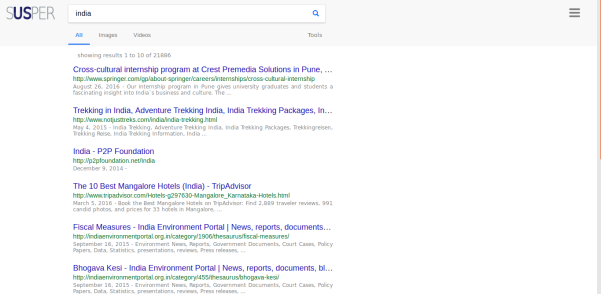
In Susper we have implemented a front end for peer-to-peer decentralised Search Engine Yacy using Yacy Search API.
The services here are very similar to the angular services that seasoned angular js developers are familiar with. This service implementation in the project is responsible for making the calls to the API whenever a query is made.
https://github.com/fossasia/susper.com/blob/master/src/app/search.service.ts
where we implemented a searchService –
getsearchresults(searchquery) {

let params = new URLSearchParams();

for (let key in searchquery) {

if (searchquery.hasOwnProperty(key)) {

params.set(key, searchquery[key]);

}

}

params.set('wt', 'yjson');

params.set('callback', 'JSONP_CALLBACK');

params.set('facet', 'true');

params.set('facet.mincount', '1');

params.append('facet.field', 'host_s');

params.append('facet.field', 'url_protocol_s');

params.append('facet.field', 'author_sxt');

params.append('facet.field', 'collection_sxt');

return this.jsonp

.get('http://yacy.searchlab.eu/solr/select', {search: params}).map(res =>

res.json()[0]

).catch(this.handleError);

}
Now that you have seen the above service it contains JSONP_CALLBACK as a parameter, which tells the server “Hey Yacy, I can understand JSON, so you could communicate or send me data in JSON”. Some servers need one to send a header Accept: application/json
*JSONP is JSON with padding, that is, you put a string at the beginning and a pair of parenthesis around it*
so what about Redux where have we used it then? Basically, every redux based project will have an action and a reducer for each state in the store. Especially for search implementation we have our reducers and actions at https://github.com/fossasia/susper.com/blob/master/src/app/reducers
And
https://github.com/fossasia/susper.com/blob/master/src/app/actions
Now going through the architecture when a user types something in the search bar a call to the action query is made this.store.dispatch(new query.QueryServerAction(event.target.value));
Which is of type QUERYSERVER
export class QueryServerAction implements Action {

type = ActionTypes.QUERYSERVER;

constructor(public payload: any) {}

}

export type Actions

= QueryAction|QueryServerAction ;
Now on the above action below effect gets called
@Injectable()

export class ApiSearchEffects {

@Effect()

search$: Observable<any>

= this.actions$

.ofType(query.ActionTypes.QUERYSERVER)

.debounceTime(300)

.map((action: query.QueryServerAction) => action.payload)

.switchMap(querypay => {

if (querypay === '') {

return empty();

}

const nextSearch$ = this.actions$.ofType(query.ActionTypes.QUERYSERVER).skip(1);

this.searchService.getsearchresults(querypay)

.takeUntil(nextSearch$)

.subscribe((response) => {

this.store.dispatch(new search.SearchAction(response));

return empty();

});

return empty();

});
If you check with the above lines it makes a call to the service we have built before. that is: searchService.getsearchresults()
On response, it dispatches the response as a payload to SearchAction
On receiving the payload with the searchAction, the searchReducer takes off the responsibility and stores the payload in a state in the store.
export function reducer(state: State = initialState, action: search.Actions): State {

switch (action.type) {

case search.ActionTypes.CHANGE: {

const search = action.payload;

return Object.assign({}, state, {

searchresults: search,

items: search.channels[0].items,

totalResults: Number(search.channels[0].totalResults) || 0,

navigation: search.channels[0].navigation,

});

}

default: {

return state;

}

}

}
Thereby results could be displayed in the results page by subscribing to the store as in this.items$ = store.select(fromRoot.getItems);
Why should we do this all why not a direct service call? There are two reasons to use ngrx store along with ngrx effects.
- Using a store the search results will be available to all components.
- When we have implemented an instant search, a query call to the server goes for each character input, thereby if the response from the server is not in order, it leads to different results. For instance, if one searches for ‘India’ they might get results shown for ‘Ind’. Which was faced by us while developing the server https://github.com/fossasia/susper.com/issues/256 where “When a user searches, there is a search performed while typing. The search results that are often shown do not always reflect the final search term, they show a result that appeared while the user was typing it in.” we solved this issue using takeUntil(nextSearch$) in the search-effect.ts

 Search box on Firefox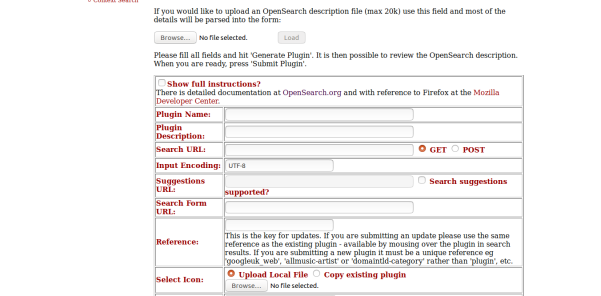




 Hong Phuc Dang meeting
  Meetup with FOSSASIA mentors and supporters from Europe Michael Christen (
You must be logged in to post a comment.