Getting user Location in SUSI Android App and using it for various SUSI Skills

Using user location in skills is a very common phenomenon among various personal assistant like Google Assistant, Siri, Cortana etc. SUSI is no different. SUSI has various skills which uses user’s current location to implement skills. Though skills like “restaurant nearby” or “hotels nearby” are still under process but skills like “Where am I” works perfectly indicating SUSI has all basic requirements to create more advance skills in near future. So let’s learn about how the SUSI Android App gets location of a user and sends it to SUSI Server where it is used to implement various location based skills. Sources to find user location in an Android app There are three sources from which android app gets users location : GPS Network Public IP Address All three of these have various advantages and disadvantages. The SUSI Android app uses cleverly each of them to always get user location so that it can be used anytime and anywhere. Some factors for comparison of these three sources : Factors GPS Network IP Address Source Satellites Wifi/Cell Tower Public IP address of user’s mobile Accuracy Most Accurate (20ft) Moderately Accurate (200ft) Least Accurate (5000+ ft) Requirements GPS in mobile Wifi or sim card Internet connection Time taken to give location Takes long time to get location Fastest way to get location Fast enough (depends on internet speed) Battery Consumption High Medium Low Permission Required User permission required User permission required No permission required Location Factor Works in outdoors. Does not work near tall buildings Works everywhere Works everywhere Implementation of location finding feature in SUSI Android App SUSI Android app very cleverly uses all the advantages of each location finding source to get most accurate location, consume less power and find location in any scenario. The /susi/chat.json endpoint of SUSI API requires following 7 parameters : Sno. Parameter Type Requirement 1 q String Compulsory 2 timezoneOffset int Optional 3 longitude double Optional 4 latitude double Optional 5 geosource String Optional 6 language Language  code Optional 7 access_token String Optional In this blog we will be talking about latitude , longitude and geosource. So, we need these three things to pass as parameters for location related skills. Let’s see how we do that. Finding location using IP Address: At the starting of app, user location is found by making an API call to ipinfo.io/json . This results in following JSON response having a field “loc” giving location of user (latitude and longitude. { "ip": "YOUR_IP_ADDRESS", "city": "YOUR_CITY", "region": "YOUR_REGION", "country": "YOUR_COUNTRY_CODE", "loc": "YOUR_LATITUDE,YOUR_LONGITUDE", "org": "YOUR_ISP" } By this way we got latitude, longitude and geosource will be “ip” . We find location using IP address only once the app is started because there is no need of finding it again and again as making network calls takes time and drains battery. So, now we have user’s location but this is not accurate. So, we will now proceed to check if we can find location using network is more accurate than location using IP…

Continue ReadingGetting user Location in SUSI Android App and using it for various SUSI Skills

Understanding the working of SUSI Hardware

Susi on Hardware is the latest addition to full suite of SUSI Apps. Being a hardware project, one might feel like it is too much complex, however it is not the case. The solution is being primary built on a Raspberry Pi which, however small it may be, is a computer. Most things you expect to work on a normal computer, work on Raspberry Pi as well with a few advantages being its small size and General Purpose I/O access. But it comes with caveats of an ARM CPU, which may not support all applications which are mainly targeted for x86. There are a few other development boards from Intel as well, which use x86/x64 architecture. While working on the project, I did not wanted to make it too generic for a board or set of Hardware, thus all components used were targeted to be cross-platform. Components that make Susi Hardware SUSI Server SUSI Server is the foremost important thing in any SUSI Project. SUSI Server handles all the queries by user which can be supplied using REST API and supplies answer in a nice format for clients. It also provides AAA: Authentication, Authorization and Accounting support for managing user accounts across platforms. Github Repository: https://github.com/fossasia/susi_server Susi Python Library Susi Python Library was developed along with Susi Hardware project. It can work independent of Hardware Project and can be included in any Python Project for Susi Intelligence. It provides easy access to Susi Server REST API through easy python methods. Github Repository: https://github.com/fossasia/susi_api_wrapper Python Speech Recognition Library The best advantage of using Python is that in most cases , you do not need to re-invent the wheel, some already has done the work for you. Python Speech Recognition library support for speech recognition through microphone and by a voice sample. It supports a number of Speech API providers like Google Speech API. Wit.AI, IBM Watson Speech-To-Text and a lot more. This provides free to choose any of the speech recognition providers. For now, we are using Google Speech API and IBM Watson Speech API. Pypi Package: https://pypi.python.org/pypi/SpeechRecognition/Github Repository: https://github.com/Uberi/speech_recognition PocketSphinx for Hotword Detection CMU PocketSphinx is an open-source offline speech recognition library. We have used PocketSphinx to enable hotword detection to Susi Hardware so you can interact with Susi handsfree. More information on its working can be found in my other blog post. Github Repository: https://github.com/cmusphinx/pocketsphinx Flite Speech Synthesis System CMU Flite (Festival-Lite) is a small sized , fast and open source speech synthesis engine developed by Carnegie Mellon University . More information of integration and usage in Susi can be found in my other blog post Project Website: http://www.festvox.org/flite/ The whole working of all these components together can be explained using the Diagram below.

Continue ReadingUnderstanding the working of SUSI Hardware

Hotword Detection for SUSI Android with CMUsphinx

Being an AI for conversational bots, Hotword detection of SUSI is the top priority to the community. Another requirement was that there should be an option for an offline hotword detection. So, I was searching for an API that has all these capabilities. Sphinx by CMU was the obvious choice. It provides robust mechanism for hotword detection. What is CMUsphinx? CMUsphinx is open source and leading speech recognition toolkit. CMUsphinx has different modules for different tasks it needs to perform. Our requirement for SUSI is, that is needs to be lightweight, So we are using Pocketsphinx. Before going into integration let us discuss about basics of speech recognition. Let us dive into coding and integrating Susi with pocketsphinx. Building Pocketsphinx .AAR file Git clone the sphinxbase, pocketsphinx and pocketsphinx-android and put them in the same folder. By following commands below. git clone http://github.com/cmupshinx/sphinxbase git clone http://github.com/cmupshinx/pocketsphinx git clone http://github.com/cmupshinx/pocketsphinx-android Then import pocketsphinx Android into Android studio. Run the project. .aar files pocketsphinx-android-5prealpha-debug.aar & pocketsphinx-android-5prealpha-release.aar  will be created in the build/outputs/aar. Integrating Susi with Pocketsphinx In Android Studio you need to the above generated AAR into your project. Just go to File > New > New module and choose Import .JAR/.AAR Package. After this, We need to change permissions of project. Add the following permissions in AndroidManifest.xml. <uses-permission android:name="android.permission.WRITE_EXTERNAL_STORAGE" /> <uses-permission android:name="android.permission.RECORD_AUDIO" /> Import the following functions into your main activity. import edu.cmu.pocketsphinx.Assets; import edu.cmu.pocketsphinx.Hypothesis; import edu.cmu.pocketsphinx.RecognitionListener; import edu.cmu.pocketsphinx.SpeechRecognizer; import edu.cmu.pocketsphinx.SpeechRecognizerSetup; Next we need to sync the assets we get from .aar file in to our project. Edit app/build.gradle build file to run assets.xml. We do it by adding following code to build.gradle. ant.importBuild 'assets.xml' preBuild.dependsOn(list, checksum) clean.dependsOn(clean_assets) Now all the import and sync errors of gradle must disappear and you should be good to go. You can start your recognizer by adding this code to your activity. recognizer = defaultSetup() .setAcousticModel(new File(assetsDir, "en-us-ptm")) .setDictionary(new File(assetsDir, "cmudict-en-us.dict")) .getRecognizer(); recognizer.addListener(this); Decoder model is lengthy process that contains many operations, so it’s recommended to run in inside async task. These are commands for decoder to run. These commands essentially do acoustic and language modelling of speech. // Create keyword-activation search. recognizer.addKeyphraseSearch(KWS_SEARCH, KEYPHRASE); // Create grammar-based searches. File menuGrammar = new File(assetsDir, "menu.gram"); recognizer.addGrammarSearch(MENU_SEARCH, menuGrammar); // Next search for digits File digitsGrammar = new File(assetsDir, "digits.gram"); recognizer.addGrammarSearch(DIGITS_SEARCH, digitsGrammar); // Create language model search. File languageModel = new File(assetsDir, "weather.dmp"); recognizer.addNgramSearch(FORECAST_SEARCH, languageModel); Speech recognition will end at onEndOfSpeech callback of the recognizer listener.  We can call recognizer.stop or recognizer.cancel(). Cancel will cancel the recognition, stop will cause the final result be passed you in onResult callback. During the recognition, you will get partial results in onPartialResult callback. Now we have integrated Pocketsphinx with SUSI.AI in Android.

Continue ReadingHotword Detection for SUSI Android with CMUsphinx

Setting up Your Own Custom SUSI AI server

When you chat with any of the SUSI clients, all the requests are made to standard SUSI server. But let us say that you have implemented some features on server and want to test it. Simply launch your server and you get your own SUSI server. You can then change the option to use your own server on the SUSI Android and Web Chat client. The first step to get your own copy of the SUSI server is browse to https://github.com/fossasia/susi_server and fork it. Clone your origin head to your local machine and make the changes that you want. There are various tutorials on how to add more servlets to SUSI server, how to add new parameters to an existing action type or maybe modification or a similar type of memory servlet. To start coding, you can either use some IDE like IDEA by Intelij (download it from here) or open the files you want to modify in a text editor. To start the SUSI server via command line terminal (and not IDE) do the following:   Open the terminal in the project directory cloned. Now write in the following command (It is expected that you have your JAVA installed with JAVA_PATH variable setup): ./gradlew build This will install all the project dependencies required for the support of the project. Next execute : bin/start.sh This will take a little time but you will soon see a popped up window in your default browser and the server will start. The landing page of the website will launch. Make the modifications in the server you were aiming. The server is up now. You can access it at local ip address here: http://127.0.0.1/ But if you try to add this local address in the URL field of any client, it will not work and give you an error. To access this server using a client, open your terminal and execute ipconfig //if you are running a windows machine{not recommended} ifconfig //if you are running a linux machine{recommended for better performance}   This will give you a list of various IP. Find Wireless LAN adapter Wi-Fi. Copy the IPv4 IP address. This is the link you need to enter in the server URL field in the client (Do not forget to add http:// before your IP address). Now sign up and you will be good to go. Additional Resources : Deploying-susi-server-on-google-cloud-with-kubernetes How-to-add-a-new-servletapi-to-susi-server how-to-add-a-new-attribute-in-an-action-type

Continue ReadingSetting up Your Own Custom SUSI AI server

Implementing Speech To Text in SUSI iOS

SUSI being an intelligent bot has the capabilities by which the user can provide input in a hands-free mode by talking and not requiring to even lift the phone for typing. The speech to text feature is available in SUSI iOS with the help of the Speech framework which was released alongside iOS 10 which enables continuous speech detection and transcription. The detection is really fast and supports around 50 languages and dialects from Arabic to Vietnamese. The speech recognition API does its heavy tasks of detection on Apple’s servers which requires an internet connection. The same API is also not always available on all newer devices and also provides the ability to check if a specific language is supported at a particular time. How to use the Speech to Text feature? Go to the view controller and import the speech framework Now, because the speech is transmitted over the internet and uses Apple’s servers for computation, we need to ask the user for permissions to use the microphone and speech recognition feature. Add the following two keys to the Info.plist file which displays alerts asking user permission to use speech recognition and for accessing the microphone. Add a specific sentence for each key string which will be displayed to the user in the alerts. NSSpeechRecognitionUsageDescription NSMicrophoneUsageDescription The prompts appear automatically when the functionality is used in the app. Since we already have the Hot word recognition enabled, the microphone alert would show up automatically after login and the speech one shows after the microphone button is tapped. 3) To request the user for authorization for Speech Recognition, we use the method SFSpeechRecognizer.requestAuthorization. func configureSpeechRecognizer() {         speechRecognizer?.delegate = self         SFSpeechRecognizer.requestAuthorization { (authStatus) in             var isEnabled = false             switch authStatus {             case .authorized:                 print("Autorized speech")                 isEnabled = true             case .denied:                 print("Denied speech")                 isEnabled = false             case .restricted:                 print("speech restricted")                 isEnabled = false             case .notDetermined:                 print("not determined")                 isEnabled = false             }             OperationQueue.main.addOperation {                 // handle button enable/disable                 self.sendButton.tag = isEnabled ? 0 : 1                 self.addTargetSendButton()             }         }     } 4)   Now, we create instances of the AVAudioEngine, SFSpeechRecognizer, SFSpeechAudioBufferRecognitionRequest,SFSpeechRecognitionTask let speechRecognizer = SFSpeechRecognizer(locale: Locale.init(identifier: "en-US")) var recognitionRequest: SFSpeechAudioBufferRecognitionRequest? var recognitionTask: SFSpeechRecognitionTask? let audioEngine = AVAudioEngine() 5)  Create a method called `readAndRecognizeSpeech`. Here, we do all the recognition related stuff. We first check if the recognitionTask is running or not and if it does we cancel the task. if recognitionTask != nil { recognitionTask?.cancel()   recognitionTask = nil } 6)  Now, create an instance of AVAudioSession to prepare the audio recording where we set the category of the session as recording, the mode and activate it. Since these might throw an exception, they are added inside the do catch block. let audioSession = AVAudioSession.sharedInstance() do { try audioSession.setCategory(AVAudioSessionCategoryRecord) try audioSession.setMode(AVAudioSessionModeMeasurement) try audioSession.setActive(true, with: .notifyOthersOnDeactivation) } catch { print("audioSession properties weren't set because of an error.") } 7)  Instantiate the recognitionRequest. recognitionRequest…

Continue ReadingImplementing Speech To Text in SUSI iOS

How to make a SUSI chat bot skill for Cortana

Cortana is assistant from Microsoft just like Siri from Apple. We can make a skill for Cortana i.e Creating your own bot with in cortana so that you can use your bot through cortana by activating it using invocation name. To create SUSI cortana skill we will use SUSI API and Microsoft bot framework. First of all we will have to make a bot on microsoft bot framework and to do so follow this tutorial. Change code in this tutorial with code given below. var restify = require('restify'); var builder = require('botbuilder'); var request = require('request'); var http = require('http'); // Setup Restify Server var server = restify.createServer(); server.listen(process.env.port || process.env.PORT || 8080, function() {    console.log('listening to ', server.name, server.url); }); // Create chat bot var connector = new builder.ChatConnector({    appId: process.env.appId,    appPassword: process.env.appPassword }); setInterval(function() {        http.get(process.env.HerokuURL);    }, 1200000); var bot = new builder.UniversalBot(connector); server.post('/api/messages', connector.listen()); //getting response from SUSI API upon receiving messages from User bot.dialog('/', function(session) {    var msg = session.message.text;    var options = {        method: 'GET',        url: 'http://api.asksusi.com/susi/chat.json',        qs: {            timezoneOffset: '-330',            q: session.message.text        }    }; //sending request to SUSI API for response    request(options, function(error, response, body) {        if (error) throw new Error(error);        var ans = (JSON.parse(body)).answers[0].actions[0].expression;        //responding back to user        session.say(ans,ans);    }) }); After making bot we have to configure this bot for Cortana and to do so select cortana from list of channel on your bot from https://dev.botframework.com and add following detail shown in figure below. Invocation name is name which you will call to use your bot. There are many ways to in invoke your skill like Run <invocation name> , Launch <invocation name>. Here is the complete list of invocation commands. How SUSI skill in cortana actually works is when user invoke SUSI skill cortana acts as middleware to send and receive responses from skill to user. After configuring your bot for Cortana test it with cortana with same hotmail account which you have used for bot framework by calling invocation name. Here is the demo video for testing SUSI Skill https://youtu.be/40yX16hxcls. You have complete creating a skill for cortana now if you want to publish it to world select manage cortana dashboard from your bots in https://dev.botframework.com and publish it to first by filling form. If you want to learn more about bot framework refer to https://docs.microsoft.com/en-us/Bot-Framework/index References: SUSI Cortana Repository: https://github.com/fossasia/susi_cortana_skill Tutorial for bot: https://blog.fossasia.org/susi-ai-bots-with-microsofts-bot-framework/

Continue ReadingHow to make a SUSI chat bot skill for Cortana

How to make SUSI kik bot

To make SUSI kik bot first you have to configure a bot. To configure bot go to https://dev.kik.com/ and make your bot by scanning code from your kik mobile app.You have to answer following questions from botsworth and make your bot.   After logging in to your dashboard get your api key by going to configuration menu on top. After your bot is setup follow given steps to create your first susi kik bot. Steps: Install Node.js from the link below on your computer if you haven’t installed it already. https://nodejs.org/en/ Create a folder with any name and open shell and change your current directory to the new folder you created. Type npm init in command line and enter details like name, version and entry point. Create a file with the same name that you wrote in entry point in above given step. i.e index.js and it should be in same folder you created. Type following commands in command line  npm install --save @kikinteractive/kik. After @kikinteractive/kik is installed type npm install --save http after http is installed type npm install --save request when all the modules are installed check your package.json these modules will be included within dependencies portion. Your package.json file should look like this. { "name": "susi_kikbot", "version": "1.0.0", "description": "susi kik bot", "main": "index.js", "scripts": { "test": "node tests/sample.js" }, "license": "MIT", "dependencies": { "@kikinteractive/kik": "^2.0.11", "request": "^2.75.0" } } Copy following code into file you created i.e index.js and add your bot name to it in place of username. var http = require('http'); var Bot = require('@kikinteractive/kik'); var request = require('request') var answer; var bot = new Bot({ username: '<your-bot-name>', apiKey: process.env.API_KEY, baseUrl: process.env.HEROKU_URL }); bot.updateBotConfiguration(); bot.onTextMessage((message) => { request('http://api.asksusi.com/susi/chat.json?q=' + encodeURI(query), function(error, response, body) { if (!error && response.statusCode == 200) { answer = JSON.parse(body).answers[0].actions[0].expression; } else { answer = "Oops, Looks like Susi is taking a break, She will be back soon"; } }); message.reply(answer) }); http.createServer(bot.incoming()).listen(process.env.PORT || 5000) Before deploying our bot to heroku so that it can be active we have to make a github repository for chatbot to make github repository follow these steps.In shell change current directory to folder we created above and  write git init git add . git commit -m”initial” git remote add origin <URL for remote repository> git remote -v git push -u origin master You will get URL for remote repository by making repository on your github and copying this link of your repository. To deploy your bot to heroku you need an account on Heroku and after making an account make an app.   Deploy app using github deployment method. Select Automatic deployment method. Go to settings of your app and config variables and paste your API key for bot to this and name it as API_KEY and get your heroku app url and make a variable for it named HEROKU_URL. Your susi bot is ready now test it by massaging it. If you want to learn more about kik API then refer to https://dev.kik.com/#/docs/messaging…

Continue ReadingHow to make SUSI kik bot

SUSI AI Bots with Microsoft’s Bot Framework

The Bot Framework is used to build intelligent chatbots and it supports .NET, Node.js, and REST. To learn about building bots using bot framework go to  https://docs.microsoft.com/en-us/bot-framework/bot-builder-overview-getstarted . Now to build SUSI AI bot for different platforms like facebook, telegram, kik, skype follow below given steps. Install Node.js from the link below on your computer if you haven’t installed it already. https://nodejs.org/en/ Create a folder with any name and open a shell and change your current directory to the new folder you created. Type npm init in shell and enter details like name, version and entry point. Create a file with the same name that you wrote in entry point in above given step. i.e index.js and it should be in same folder you created. Type following commands in command line  npm install --save restify.After restify is installed type npm install --save botbuilder   after botbuilder is installed type npm install --save request when all the modules are installed check your package.json modules will be included within dependencies portion. Your package.json file should look like this. { "name": "skype-bot", "version": "1.0.0", "description": "SUSI AI Skype Bot", "main": "app.js", "scripts": {   "test": "echo \"Error: no test specified\" && exit 1",   "start": "node app.js" }, "author": "", "license": "ISC", "dependencies": {   "botbuilder": "^3.8.1",   "request": "^2.81.0",   "restify": "^4.3.0" } } Copy following code into file you created i.e index.js var restify = require('restify'); var builder = require('botbuilder'); var request = require('request'); // Setup Restify Server var server = restify.createServer(); server.listen(process.env.port || process.env.PORT || 8080, function() {    console.log('%s listening to %s', server.name, server.url); }); // Create chat bot var connector = new builder.ChatConnector({  appId: process.env.appId,  appPassword: process.env.appPassword }); var bot = new builder.UniversalBot(connector); server.post('/api/messages', connector.listen()); //When bot is added by user bot.on('contactRelationUpdate', function(message) {    if (message.action === 'add') {        var name = message.user ? message.user.name : null;        var reply = new builder.Message()            .address(message.address)            .text("Hello %s... Thanks for adding me. You can talk to SUSI now.", name || 'there');        bot.send(reply);    } }); //getting response from SUSI API upon receiving messages from User bot.dialog('/', function(session) {    var options = {        method: 'GET',        url: 'http://api.asksusi.com/susi/chat.json',        qs: {            timezoneOffset: '-330',            q: session.message.text        }    }; //sending request to SUSI API for response    request(options, function(error, response, body) {        if (error) throw new Error(error);        var ans = (JSON.parse(body)).answers[0].actions[0].expression;        //responding back to user        session.send(ans);    }) }); You have to replace appID and appPassword with your own ID and Password which you can get by below given steps. Sign in/Sign up to this https://dev.botframework.com/. After signing in go to My Bots option at the top of the page and Create/Register your bot. Enter details of your bot and click on “Create Microsoft App ID and password”.  Leave messaging endpoint for now after getting app ID and password we will write messaging endpoint. Copy your APP ID and Password and save them for later use. Paste your App ID in box given for ID on bot registration page. Now we have to create messaging endpoint to listen for requests. Make a github repository and push…

Continue ReadingSUSI AI Bots with Microsoft’s Bot Framework

Using react-url-query in SUSI Chat

For SUSI Web Chat, I needed a query parameter which can be passed to the components directly to activate the SUSI dreams in my textarea using just the URL which is not easy when one is using react-router. React URL Query is a package for managing state through query parameters in the URL in React. It integrates well with React Router and Redux and provides additional tools specifically targeted at serializing and deserializing state in URL query parameters. So for example, if one wants to pass some parameters to populate in your component directly through the URL, you can use react-url-query. Eg. http://chat.susi.ai/?dream=fossasia will populate fossasia in our textarea section without actually typing the term textarea. So this in the URL, Will produce this in the textarea, To achieve this. the following steps are required: First we proceed with installing the packages (Dependencies  - history) npm install history --save npm install react-url-query --save   We then instantiate a history in our component where we want to listen to the parameters like the following code. Our class ChatApp is where we want to pass the params. ChatApp.react.js import history from '../history'; //Import the history object from the History package. // force an update if the URL changes inside the componentDidMount function componentDidMount() { history.listen(() => this.forceUpdate()); }  Next, we define the props of the parameters in our Message Section. For that we need the following props- urlPropsQueryConfig - this is where we define our URLConfig Static proptypes - the query param to which we want to pass the value, so for me it’s dream. The defaultProps when no such value is being passed to our param should be left a blank. And then we finally assign the props. This is then passed to the Message Composer Section from where we receive the value passed. MessageSection.react.js // Adding the UrlConfig const urlPropsQueryConfig = { dream: { type: UrlQueryParamTypes.string } }; // Defining the query param inside our ClassName static propTypes = { dream: PropTypes.string } // Setting the default param static defaultProps = { dream: '' } //Assigning the props inside the render() function const { dream } = this.props; //Passing the dream to the MessageComposer Section <MessageComposer threadID={this.state.thread.id} theme={this.state.darkTheme} dream={dream} /> //Exporting our Class export default addUrlProps({ urlPropsQueryConfig })(ClassName); Next we update the Message Composer section by the props we had passed. For this we first check if the props are null, we don’t populate it in our textarea if it is, otherwise we populate the textarea with the value ‘dream + props.dream’ so the value passed in the URL will be prepend by a word dream to enable the ‘dream value’ in our textarea. The full file is available at MessageComposer.js //Add Check to the constructor constructor(props) { super(props); this.state = {text: ''}; if(props.dream!==''){ //Setting the text as received ‘dream dreamPassed’ this.state= {text: 'dream '+ props.dream} } } // Populate the textarea <textarea name="message" value={this.state.text} onChange={this._onChange.bind(this)} onKeyDown={this._onKeyDown.bind(this)} ref={(textarea)=> { this.nameInput = textarea; }} placeholder="Type a message..." /> // Add props to…

Continue ReadingUsing react-url-query in SUSI Chat

Using SUSI as your dictionary

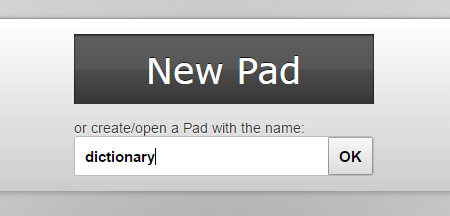
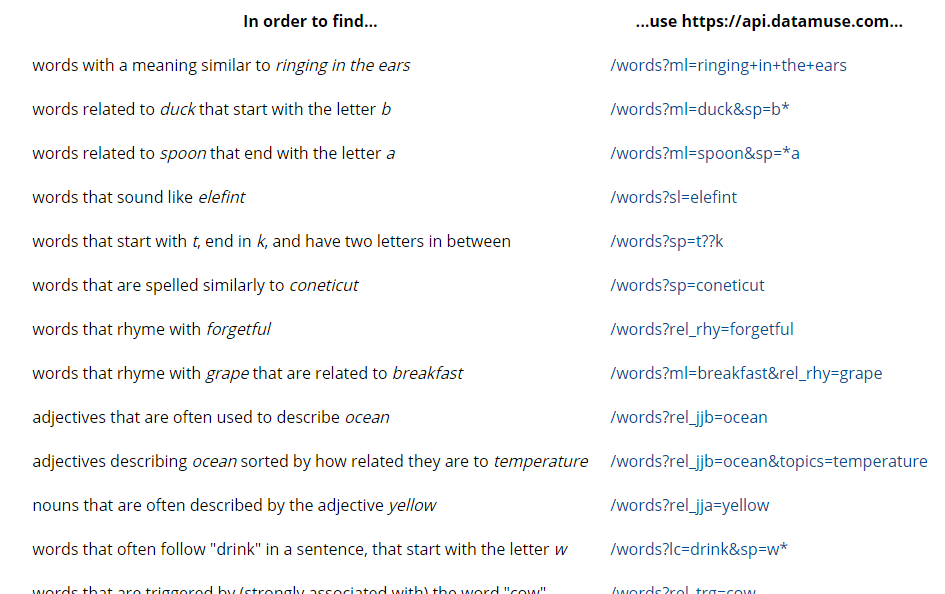
SUSI can be taught to give responses from APIs as well. I made use of an API called Datamuse which is a premier search engine for English words, indexing 10 million unique words and phrases in more than 1000 dictionaries and glossaries. 1. First, we head towards creating our dream pad for creating rules for the skill. To do this we need to create a dream at dream.susi.ai and give it a name, say dictionary. 2. After that one needs to go to the API and check the response generated. 3. Going through the docs of the API, one can create various queries to produce informative responses as follows - Word with a similar meaning. define *| Meaning of *| one word for * !console: $word$ { "url":"https://api.datamuse.com/words?ml=$1$", "path":"$.[0]" } eol Word related to something that start with a given letter. word related to * that start with the letter * !console: $word$ { "url":"https://api.datamuse.com/words?ml=$1$&sp=$2$*", "path":"$.[0]" } eol Word that sound like a given word.. word that sound like *|sounding like * !console: $word$ { "url":"https://api.datamuse.com/words?sl=$1$", "path":"$.[0]" } eol Words that are spelled similarly to a given word. words that are spelled similarly to *| similar spelling to *| spelling of * !console: $word$ { "url":"https://api.datamuse.com/words?sp=$1$", "path":"$.[0]" } eol Word that rhyme with a given word. rhyme *| word rhyming with * !console: $word$ { "url":"https://api.datamuse.com/words?rel_rhy=$1$", "path":"$.[0]" } eol Adjectives that are often used to describe a given word. adjective to describe *|show adjective for *|adjective for * !console: $word$ { "url":"https://api.datamuse.com/words?rel_jjb=$1$", "path":"$.[0]" } eol Suggestions for a given word. suggestions for *| show words like *| similar words to * | words like * !console: $word$ { "url":"https://api.datamuse.com/sug?s=$1$", "path":"$.[0]" } eol This is a sample query response for define * To create more dictionary skills go to http://dream.susi.ai/p/dictionary and add skills from the API. To contribute by adding more skills, send a pull request to the susi_skill_data.  To test the skills, you can go to chat.susi.ai

Continue ReadingUsing SUSI as your dictionary