
Add Navigation Architecture Component in Eventyay Attendee
The eventyay attendee is an android app which allows users to discover events happening around the world using the Open Event Platform. It consumes the APIs of the open event server to get a list of available events and can get detailed information about them.
The project earlier used Fragment transition to handle fragment with multiple activities. Multiple activities are used because it is very complex to handle all fragment with a single activity using fragment transition. If we try to make a single activity application with fragment transition, it contains a lot of bugs with the back stack.
But we can use Navigation Architecture Component to efficiently make Eventyay attendee a single activity. It is the perfect technology to handle all fragments and authentication in a single activity with no bigs or back stack.
- Issues with fragment transition and multiple activities
- Why navigation architecture component?
- Process for using Navigation Architecture Component in the application
- Animation of fragments with Navigation Architecture Component
- Conclusion
- Resources
Let’s analyze every step in detail.
Issues with fragment transition and multiple activities
- Need to handle back stack on each Fragment Transition
- Hard to debug
- This can leave your app in an unknown state when receiving multiple click events or during configuration changes.
- Fragment instances can be created
- Multiple activities make the app slower due to using multiple intents
Why navigation architecture component?
- Handling Fragment transactions
- Handling Up and Back actions correctly by default
- Providing standardized resources for animations and transitions
- Treating deep linking as a first-class operation
- Including Navigation UI patterns, such as navigation drawers and bottom navigation, with minimal additional work
- Providing type safety when passing information while navigating
- Visualizing and editing navigation graphs with Android Studio’s Navigation Editor
Steps involved in using Navigation Architecture Component in the application
Adding dependencies to build.gradle:
//Navigation
    implementation 'android.arch.navigation:navigation-fragment:1.0.0-alpha09'
    implementation 'android.arch.navigation:navigation-ui:1.0.0-alpha09'
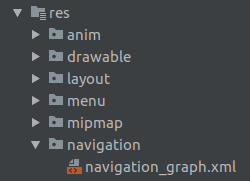
Create new resources file for navigation graph under res -> navigation:
Add fragments in navigation_graph.xml with navigation editor. Let’s take one example:
<?xml version="1.0" encoding="utf-8"?>
<navigation xmlns:android="http://schemas.android.com/apk/res/android"
    xmlns:app="http://schemas.android.com/apk/res-auto"   android:id="@+id/mobile_navigation"
    app:startDestination="@id/eventsFragment">

    <fragment
        android:id="@+id/eventsFragment"
        android:name="org.fossasia.openevent.general.event.EventsFragment"
        android:label="EventsFragment" />
</navigation>
Here app:startDestination attribute is for the very first fragment after which app exit on back pressed.
Replace Frame layout with a fragment in the main activity layout file. And add the above navigation graph to it:
<fragment
            android:id="@+id/frameContainer"
            android:name="androidx.navigation.fragment.NavHostFragment"
            android:layout_width="match_parent"
            android:layout_height="0dp"
            android:background="@android:color/white"
            android:layout_weight="1"
            app:defaultNavHost="true"
            app:navGraph="@navigation/navigation_graph"
            app:layout_behavior="@string/appbar_scrolling_view_behavior" />
Now, this fragment layout is directly connected with all fragments added in the navigation graph. We only need to navigate the fragment.
Set bottom navigation drawer with the navigation architecture component –
First, we need to make the ids of menu component same as the ids of fragments in the navigation graph. Bottom navigation menu:
<?xml version="1.0" encoding="utf-8"?>
<menu xmlns:android="http://schemas.android.com/apk/res/android">
    <item
        android:id="@+id/eventsFragment"
        android:icon="@drawable/ic_baseline_event_24px"
        android:title="@string/events" />
    <item
        android:id="@+id/searchFragment"
        android:icon="@drawable/ic_search_grey_24dp"
        android:title="@string/search" />
    <item
        android:id="@+id/favoriteFragment"
        android:icon="@drawable/ic_baseline_favorite_border_24px"
        android:title="@string/likes" />
    <item
        android:id="@+id/orderUnderUserFragment"
        android:icon="@drawable/ic_baseline_ticket_24dp"
        android:title="@string/tickets" />
    <item
        android:id="@+id/profileFragment"
        android:icon="@drawable/ic_baseline_account_circle_24px"
        android:title="@string/profile" />
</menu>
Setup the bottom navigation menu with navigation controller:
// import require libraries
import androidx.navigation.fragment.NavHostFragment
import androidx.navigation.ui.NavigationUI.setupWithNavController

// Set nav controller with host fragment using Kotlin smart cast
val hostFragment = supportFragmentManager.findFragmentById(R.id.frameContainer)
 if (hostFragment is NavHostFragment)
     navController = hostFragment.navController
setupWithNavController(navigationMenu, navController)
Navigate fragment for bottom naviagtion whenever required:
navController.navigate(R.id.munuItemId)
Navigate any fragment which is added in navigation graph with arguments:
import androidx.navigation.Navigation
findNavController(rootView).navigate(R.id.fragmentId,  arguments)
Add Animations for fragments using navigation architecture component
Add require animations in utils as navigation options:
fun getAnimFade(): NavOptions {
        val builder = NavOptions.Builder()
        builder.setEnterAnim(R.anim.fade_in)
        builder.setExitAnim(R.anim.fade_out)
        builder.setPopEnterAnim(R.anim.slide_in_left)
        builder.setPopExitAnim(R.anim.slide_out_right)
        return builder.build()
    }

    fun getAnimSlide(): NavOptions {
        val builder = NavOptions.Builder()
        builder.setEnterAnim(R.anim.slide_in_right)
        builder.setExitAnim(R.anim.slide_out_left)
        builder.setPopEnterAnim(R.anim.slide_in_left)
        builder.setPopExitAnim(R.anim.slide_out_right)
        return builder.build()
    }
Resource files for animations (fade_in, fade_out, slide_in_right, slide_out_left, slide_in_left, slide_out_right) are added in res -> anim.
Now add nav options whenever navigate to fragments:
import androidx.navigation.Navigation
import org.fossasia.openevent.general.utils.Utils
findNavController(rootView).navigate(R.id.fragmentId,  arguments, getAnimFade())
GIF

In a Nutshell
Single activity application is the future of Android and many apps are shifting towards single activity Architecture from multiple activity ones. This brings in ease to use and smooth user experience. In shifting to a single activity, we have used Navigation Architecture Component which is much more efficient than Fragment transition which has many bugs associated with it while converting the app to a single activity.
Resources
- Documentation for navigation architecture component: https://developer.android.com/topic/libraries/architecture/navigation/
- Google navigation codelab: https://codelabs.developers.google.com/codelabs/android-navigation/
Tags
Eventyay, open-event, Navigation, Fragment, FOSSASIA, GSoC, Android, Kotlin


You must be logged in to post a comment.