Science Hack Day Singapore Nov 11 – 12, 2016

We are happy to announce our upcoming Science Hack Day Singapore! The event will take place on Nov 11 - 12, 2016 at Suntec Convention Centre Hall 401 as a part of the ICM Youth Festival. Registration is now open at Eventbrite. There are limited seats for participants intending to take part in the programme for 2 days. Visitors to the ICM youth festival are welcome to visit the space and give their hands where required. Add your hack ideas here  Do not miss this opportunity to explore the wonder of Science, to team up with inspiring people around you and to enjoy the amazing working facilities at Suntec City. Join our event on facebook for further announcement.  What is Science Hack Day?   Science Hack Day is a two-day event where anyone excited about making weird, silly or serious things with science comes together in the same physical space to see what they can prototype. Designers, developers, scientists and anyone who is excited about making things with science are welcome to attend – no experience in science or hacking is necessary, just an insatiable curiosity. Recommended age is 13 and up, though younger students are welcome to attend, with parental accompaniment. The mission of Science Hack Day is to get excited and make things with science! People organically form multidisciplinary teams over the course of a weekend: particle physicists team up with designers, marketers join forces with open source rocket scientists, writers collaborate with molecular biologists, and developers partner with school kids. By collaborating on focused tasks during this short period, small groups of hackers are capable of producing remarkable results. Tentative program  Day 1 Friday Nov 11, 2016 11:00  Arrive and check-in 11:30 Welcome & introduction 11:45 Pitches and team building 12:15 Hack begins 13:30 Lunch break 14:30 Hacking continues 19:00 Door closes Day 2 Saturday Nov 12, 2016  11:00 Doors open 13:00 Lunch Break 15:00 Hack stops 15:30 Hack demos begin! (Typically 2-3 minutes per demo) 17:00 Winning teams announced  Organizers Science Hack Day Singapore is organised by Science Centre Singapore and FOSSASIA. Venue is sponsored by IDA. 

Continue ReadingScience Hack Day Singapore Nov 11 – 12, 2016

PSLab Code Repository and Installation

PSLab  is a new addition to FOSSASIA Science Lab. This tiny pocket science lab  provides  an array of necessary equipments for doing science and engineering experiments. It can function like an oscilloscope, waveform generator, frequency counter, programmable voltage and current source and also as a data logger. The control and measurement functions are written in Python programming language. Pyqtgraph is used for plotting library. We are now working on Qt based GUI applications for various experiments. The following are the code repositories of PSLab. https://github.com/fossasia/pslab  : This repository hosts the Communication library for  PSLab. https://github.com/fossasia/pslab-apps  : This repository is for Qt based GUI programs, widgets and templates for various experiments. Installation To install PSLab on Debian based Gnu/Linux system, the following dependencies must be installed. Dependencies ============ PyQt 4.7+, PySide, or PyQt5 python 2.6, 2.7, or 3.x NumPy, Scipy pyqt4-dev-tools #for pyuic4 Pyqtgraph #Plotting library pyopengl and qt-opengl #for 3D graphics iPython-qtconsole #optional Now clone both the repositories pslab-apps and pslab . Libraries must be installed in the following order 1. pslab-apps 2. pslab To install, cd into the directories $ cd <SOURCE_DIR> and run the following (for both the repos) $ sudo make clean $ sudo make $ sudo make install Now you are ready with the PSLab software on your machine :) For the main GUI (Control panel), you can run Experiments from the terminal. $ Experiments If the device is not connected the following splash screen will be displayed. After clicking OK, you will get the control panel with menus for Experiments, Controls, Advanced Controls and Help etc. (Experiments can not be accessed unless the device is connected) The splash screen and the control panel, when PSLab is connected to the pc. From this control panel one can access controls, help files and various experiments through independent GUI's written for each experiment. You can help ------------ Please report a bug/install errors here Your suggestions to improve PSLab are welcome :) What Next: We are now working on a general purpose Experimental designer. This will allow selecting controls and channels and then generate a spread sheet. The columns from this spreadsheet can be selected and plotted.  

Continue ReadingPSLab Code Repository and Installation

New Tools and Sensors for FOSSASIA PSLab and ExpEYES

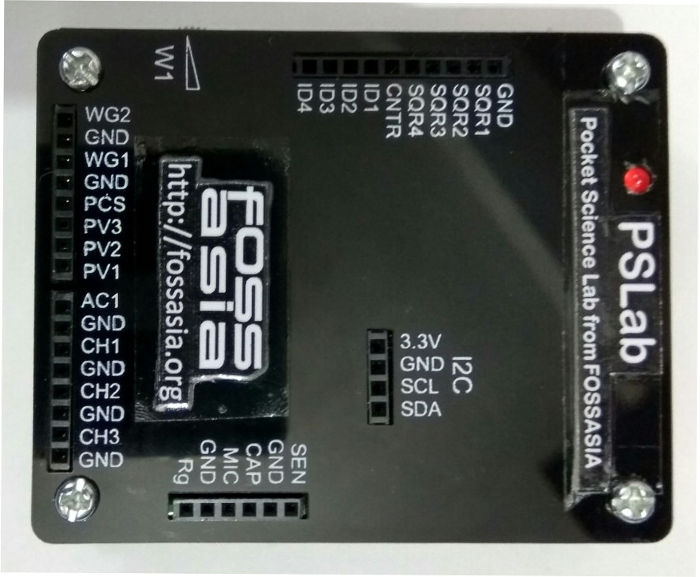
ExpEYES: Open Source Science Lab' is a project FOSSASIA is supporting since 2014. As a part of GSoC-14 and GSoC-15 we started actively developing Pocket Science Lab for open science education. The objective is to make create the most affordable open source pocket lab which can help millions of students and citizen scientists all over the world to  learn science by exploring and experimenting. We are currently working on  adding new tools/sensors and also  developing a new lab interface with higher capabilities to be added to FOSSASIA Science Lab. My goal for this year's project is to add new experiments to the ExpEYES library. I also started working on new lab interface. Here is my kitchen converted to a work space, my GSoC Lab:) Linear Air track for mechanics experiments, super-critical dryer which uses PSLab for temperature control and monitoring with other instruments. In the month of May-16, I spent few days at IUAC - Inter University Accelerator Centre, New Delhi, to work with Dr. Ajith Kumar ( Inventor of Expeyes). The time spent at IUAC was most useful as we got help and inputs from many people at IUAC and also the participant teachers of ExpEYES training programme. We designed some new experiments to be done with ExpEYES. Planned improvements in Mechanics experiments especially the experiments on linear air track. We also started working on the new lab interface. Thanks to Jithin B.P. for helping us out with all the development. With the continuous collective efforts now we have a new lab interface. "PSLab: Pocket Science Lab from FOSSASIA". Here I am trying to give all the details of the equipment and the development done so far and the things planned for next couple of months. PSLab: Pocket Science Lab from FOSSASIA Size of PSLab is 62mmx78mmx13mm. The front panel will be slightly different than the one in the picture. It will have little extra portion in the top right corner to accommodative 90 degree connector pins. something like this. We will finalize the front panel design in a week and get the panels screen printed. The sample kits will be sent to my mentors for testing and suggestions.) Main Features and GUI's PSLab can function like an oscilloscope, data logger, waveform generator, frequency counter, programmable voltage source etc. It can be plugged in to USB port of PC or SBC's like Raspberry Pi. PSLab has: 2 variable sine waves 4 programmable  square wave generators 3 programmable voltage sources Programmable constant current source 4 channels for fetching data Sensor input Berg Strip sockets  etc... We are also working on to add wireless sensor interface. This will enable PSLab in accessing various sensors using a wireless module. PSLab Code repository , Installation and Communicating with PSLab All the programs are written in Python. PyQt is used for GUI designing and Pyqtgraph is used for plotting library. I have created two repositories  for PSLab https://github.com/fossasia/pslab: This repo hosts the python library for PSLab (Communication Library depends on python, python-serial, python-numpy) https://github.com/fossasia/pslab-apps: GUI programs and templates for…
Continue ReadingNew Tools and Sensors for FOSSASIA PSLab and ExpEYES