Awesome Kivy Revelations

We are using kivy for the GUI of the knit editor. It can be used to create Android, Windows, Linux, Mac and IOS apps. You can divide UI-design and code by using the kv language. In this blog post, I want to share some revelations I had when using kivy. This includes showing you how you can update translations automatically when the configuration changes and subtracting values. This awaits you: Automatic Update of Translated Text in the Kivy UI In projects like Django, there is the "_" function that allows translations of text. The implementation usually look calls a "gettext" function of some sort, which takes a string and returns its translation as a string. What we have in the kniteditor, is an observable translation, with the same interface: def _(string): """Translate a string using the current language. :param str string: the string to translate :return: the translated string :rtype: str """ return _locales.gettext(string) _ = ObservableTranslation(_) The difference is that the observable translation can be used like the "_" function but has additional methods that allow the UI to register and be notified when the language changes. When the language is changed, the global "gettext" is replaced by the "gettext" in the new language and, inthe last line, the observers are notified about the change. def change_language_to(new_language): """Change the language to a language from the translations folder. :param str new_language: the language code of the new language """ global _locales, _current_language _locales = gettext.translation(DOMAIN, _locale_dir, languages=[new_language]) _current_language = new_language _.language_changed() To see what this does, we can look at the whole implementation. I would like to give the whole picture, first, as it clarifies the context and discuss them below. """Observable Translations for kivy that change when the language changes. The functionality of this module is highly inspired by `kivy-gettext-example <https://github.com/tito/kivy-gettext-example>`. """ from kivy.lang import Observable class ObservableTranslation(Observable): """This class allows kivy translations to be updated with the language.""" def __init__(self, translate): """Create a new translation object with a translation function. :param translate: a callable that translates the text. Even when the language is changed, it returns the text for the current language. """ super().__init__() self._translate = translate self._observers = [] def __call__(self, text): """Call this object to translate text. :param str text: the text to translate :return: the text translated to the current language """ return self._translate(text) def fbind(self, name, func, args, **kwargs): """Add an observer. This is used by kivy.""" self._observers.append((name, func, args, kwargs)) def funbind(self, name, func, args, **kwargs): """Remove an observer. This is used by kivy.""" key = (name, func, args, kwargs) if key in self._observers: self._observers.remove(key) def language_changed(self): """Update all the kv rules attached to this text.""" for name, func, args, kwargs in self._observers: func(args, None, None) __all__ = ["ObservableTranslation"] The constructor takes the "_" function. When the object is called like a function, the "__call__" method is invoked, translating like "_". If we only have these two methods, the observable translation works just like the "_" function. "fbind" and "funbind" are the methods…

Continue ReadingAwesome Kivy Revelations

Language Localization for Engelsystem

Localization takes place when you adapt content to a specific location. In translation, it means that your content can be read by another in their native language with as much ease as if the information were written in that language to begin with. In other words, just translating a document does not mean that it has been localized. When it is your brand, information, or material at stake, it is important to understand the elements that separate a mere translation from the language localization necessary to maximize impact with your target audience. Some Examples of Localized Content Understanding excellent localization may be easier with some positive examples. Google is the search engine of choice in much of the English-speaking world. It accounts for only one percent of the search market in China, however. Baidu gives Chinese users the look and feel that they understand. Has Google given up? Hardly, they are working on improving the localization of their content. Many television and phone manufacturers compete for the French markets. Samsung is made in Korea, but they marketed themselves according to the French tastes and desires. The manufacturer stressed the artistic design and high definition of its televisions. Their phones were tailored to the French market with apps specifically designed for the French lifestyle and location of the users. Packaging is very important to an American consumer, even with toiletries; it is not very important at all to Chinese consumers. Proctor and Gamble localized their product marketing for Crest toothpaste by reducing their packaging costs and focusing on the flavors, which the Chinese do value. The localization not only increased their market share but cut their costs by 50 percent. Remember, the purpose of localization is to give your text or product the impression that they were designed or written specifically for that market regardless of the language, culture, or location. Understanding the Localization Process in Translation Within the world of translation, localization includes a number of critical elements such as: Modification of grammar, punctuation, and lexical elements Adaptation of formality and other culturally-based items of etiquette Ensuring figurative language is replaced with localized idioms and metaphors Making sure content is culturally sensitive and relevant Aligning conversions such as money, time, dates, voltages, and so forth Formatting numbers, values, and so on according to local variations Verifying the text and format meet legal requirements In order to localize content, the translator must have a comprehensive understanding of the culture, the language, and the specific field the information references. Note, in the list above, those cultural adaptations are as important to the translation as lexical and grammatical issues. Local sensitivities must be considered to avoid conflicts with culture, customs, or habits. Some specific items that might be tailored to the local populace are references to political leaders or situations that are deemed offensive (think about China and Taiwan), animals (rats are looked upon favorably in china as is the chicken), flowers, gestures, shoes (wearing shoes inside can be taboo), gum (illegal in…

Continue ReadingLanguage Localization for Engelsystem

Language Localization on Engelsystem

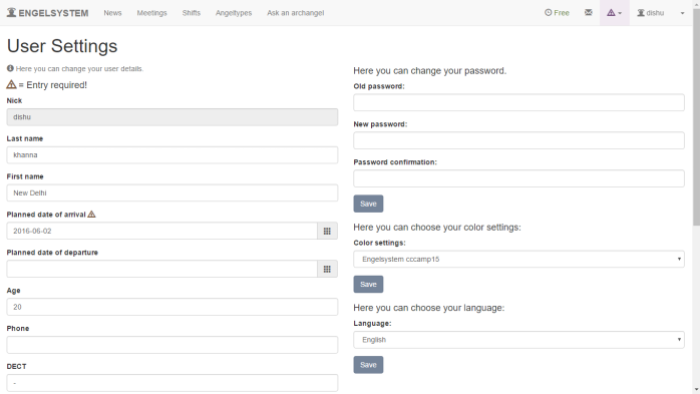
During the 3rd  week of my Summer of Code, I worked on implementing Localization of different languages on the system and creating a different settings page for user and admin. One of our goals is for Engelsystem to be a great experience for users worldwide. To achieve this goal we need to make some significant changes. The main reason of localization is that it can be used by different people with different native languages across the world and help them to understand the system better . First, a little background. Right now, Engelsystem has two localization systems available: Deutsch English All of the current translations will be updated. We are also expanding the list of supported languages to as many as we can. Currently, I’ve implemented: Bulgarian Chinese- simplified English UK French Hindi-IN Hungarian Irish Punjabi-IN Spanish Tamil-IN The tools used in implementing localization are poedit where we create the .po files . For installing Poedit on Linux distro’s, users can use the following command in the terminal, sudo apt-get install poedit For Windows and Mac users, they can download the executable file here. Steps to run Poedit in Linux/Windows/Mac: choose File → New Catalog.Enter the details in Translation properties like your email. Source code charset should be selected as UTF-8.Now the source path should be selected as (.) dot to tell Poedit to search for PHP files in the same folder. In the source, there are three options ‘_’ , ‘gettext’ and  ‘gettext_noop’.Make sure all necessary functions are added and press OK. Now we can see the list of strings on left and their translated strings on the right.we need to install the necessary dictionary for this. Save the file  with an extension ‘.po’ .  In Engelsystem, to implement the translated localization file we need to make the changes in the file,internationalization_helper.php $locales = array( ‘de_DE.UTF-8’ => “Deutsch”, ‘hi_IN.UTF-8’ => “Hindi”, ‘sp_EU.UTF-8’ => “Spanish”, ‘en_US.UTF-8’ => “English” ); During the week 3 of my Summer of Code I also worked on creating different settings page for user and Admin. Earlier settings page for user and admin were same, providing same privileges to both of them. Now we have separate pages for both. In the later weeks, other developers and I would be working on adding more languages to the system. Anyone who would like to work in the project are welcome. Developers can feel free to take up any issues they would like to work on just like any other open source projects. Development: https://github.com/fossasia/engelsystem                                           Issues/Bugs:https://github.com/fossasia/engelsystem/issues

Continue ReadingLanguage Localization on Engelsystem