

Integrate prettier with lint-staged and ESLint for consistent code style throughout the project
SUSI Skill CMS presently use ESLint to check for code linting errors, the ESLint rules are written in a separate .eslintrc file which lives at the project root. The project didn’t follow any best practices for react apps and the rules were weak therefore a lot of bad/unindented code was present in the project which takes a lot of time to fix manually, not to mention there was no mechanism to auto-format the code while committing. Also, code reviews take a lot of time to discuss code styles and fixing them.
Prettier comes to the rescue as it’s a code formatter which provides a ton of options to achieve the desired well-formatted code. Prettier enforces a consistent code style across your entire codebase because it disregards the original styling by parsing it away and re-printing the parsed code with its own rules
Add prettier as a development dependency
npm install prettier --save-dev --save-exact
Similar to how we write ESLint rules in a separate .eslintrc file, we have a .prettierrc file which contains rules for prettier but since we already have ESLint so we run prettier on top of ESLint to leverage functionalities of both packages, this is achieved by using eslint-plugin-prettier and eslint-config-prettier which exist for ESLint. These packages are saved as devDependencies in the project and “prettier” as a plugin is added to .eslintrc file and recommended prettier rules are extended by adding “prettier” in .eslintrc file.
Install the config and plugin packages
npm i eslint-plugin-prettier eslint-config-prettier --save-dev
To run prettier using ESLint, add the prettier to ESLint plugins and add prettier errors to ESLint rules.
// .eslintrc
{
 "plugins": ["prettier"],
 "rules": {
   "prettier/prettier": "error"
 }
}
Extending Prettier rules in ESLint
// .eslintrc
{
 ...
 "extends": ["prettier"]
 ...
}
5856 linting errors found which were undetected initially (SUSI Skill CMS).

Add a .prettierrc file with some basic formatting rules for now like enabling single quotes wherever applicable and to have trailing comma at the end of JSON objects.
// .prettierrc
{
   "singleQuote": true,
   "trailingComma": "all",
   "parser": "flow"
}
Add a format script in package.json so that user can format the code whenever required manually too.
// package.json
"scripts": {
        ...
        "format": "prettier --write \"src/**/*.js\"",
        ...
},
Since we want to prevent contributors from committing unindented code we used lint-staged, a package which runs tasks on a set of specified files. We achieve this by adding a set of tasks in the lint-staged object and then run lint-staged as a pre-commit hook using husky.
Install lint-staged as a development dependency which will be visible in package.json file.
npm i lint-staged --save-dev
Add tasks for lint-staged as an object in package.json, we add a lint-staged object in the pacage.json file and grab all .js files in the project and run eslint, prettier over them and then we finally run git add to stage the changes done by prettier.
// package.json

"lint-staged": {
   "src/**/*.js": [
     "eslint src --ext .js",
     "prettier --write",
     "git add"
   ]
 }
Call lint-staged in pre-commit git-hook to run the specified tasks in the package.json.
// package.json

"scripts": {
   ...
   "precommit": "lint-staged",
   ...
},
Running lint-staged tasks before committing
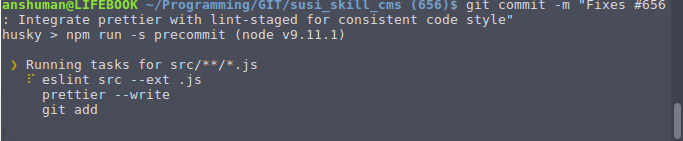
As a result, we save a lot of time in reviewing the code since we don’t have to be worried about the code styles anymore as pre-commit hook already takes care of that also this ensures consistent code style throughout the project which improves the overall quality.
Resources
Prettier library website
Use ESLint to run Prettier
Link to my Pull Request
eslint-plugin-prettier
eslint-config-prettier