Features and Controls of Pocket Science Lab

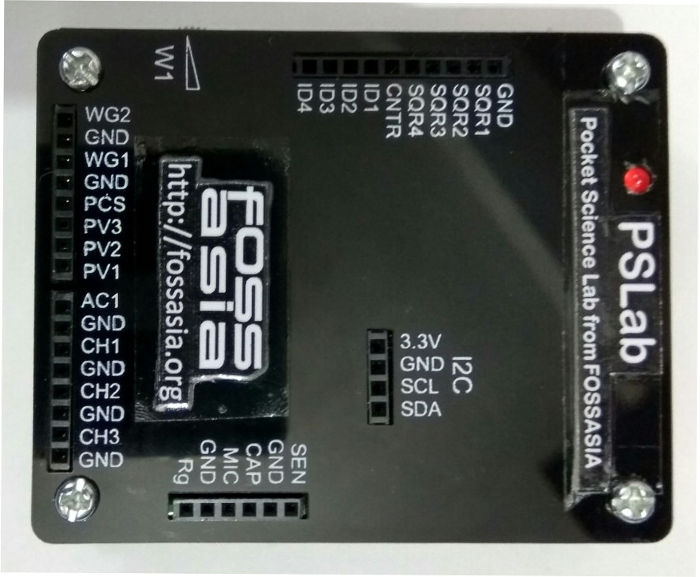
Prerequisite reading: https://blog.fossasia.org/pslab-code-repository-and-installation/ PSLab is equipped with array of useful control and measurement tools. This tiny but powerful Pocket Science Lab enables you to perform various experiments and study a wide range of phenomena. Some of the important applications of PSLab include a 4-channel oscilloscope, sine/triangle/square waveform generators, a frequency counter, a logic analyser and also several programmable current and voltage sources. Add-on boards, both wired as well as wireless(NRF+MCU), enable measurement of physical parameters ranging from acceleration and angular velocity, to luminous intensity and Passive Infra-red. (Work under progress...) As a reference for digital instruments a 12-MHz Crystal is chosen and a 3.3V voltage regulator is chosen for the analogue instruments. The device is then calibrated against professional instruments in order to squeeze out maximum performance. Python based communication library and experiment specific PyQt4 based GUI's make PSLab a must have tool for programmers, hobbyists, science and engineering teachers and also students. PSLab is interfaced and powered by USB port of the computer. For connecting external signals it has several input/output terminals as shown in the figure. Feature list for the acquisition and control : The most important feature of PSLab is a 4-channel oscilloscope which can monitor analog inputs at maximum of 2 million samples per second. Includes the usual controls such as triggering, and gain selection. Uses Python-Scipy for curve fitting.     Waveform Generators W1 : 5Hz - 5KHz arbitrary waveform generator. Manual amplitude control up to +/-3Volts W2 : 5Hz - 5KHz arbitrary waveform generator. Amplitude of +/-3Volts. Attenuable via software PWM : There are four phase correlated PWM outputs with maximum frequency 32MHz, 15nano second duty cycle, and phase difference control. Measurement Functions Frequency counter tested up to 16 MHz. Capacitance Measurement. pF to uF range PSLab has several 12-bit Analog inputs (function as voltmeters) with programmable gains, and maximum ranges varying from +/-5mV to +/-16V. Voltage and Current Sources 12-bit Constant Current source. Maximum current 3.3mA [subject to load resistance]. PSLab has three 12-bit Programmable voltage sources/ +/-3.3V,+/-5V,0-3V . (PV1, PV2, PV3) Other useful tools 4MHz, 4-channel Logic analyzer with 15nS resolution.Voltage and Current Sources SPI,I2C,UART outputs that can be configured and controlled entirely through Python functions. (Work in progress...) On-board 2.4GHz transceiver for wireless data acquisition. (Work in progress..) Graphical Interfaces for Oscilloscope, Logic Analyser, streaming data, wireless acquisition, and several experiments developed that use a common framework which drastically reduces code required to incorporate control and plotting widgets. PSLab also has space for an ESP-12 module for WiFi access with access point / station mode. Screen-shots of GUI apps. With all these features PSLab is taking a good shape and I see it as a potential tool that can change the way we teach and learn science. :) :)  

Continue ReadingFeatures and Controls of Pocket Science Lab

PSLab Code Repository and Installation

PSLab  is a new addition to FOSSASIA Science Lab. This tiny pocket science lab  provides  an array of necessary equipments for doing science and engineering experiments. It can function like an oscilloscope, waveform generator, frequency counter, programmable voltage and current source and also as a data logger. The control and measurement functions are written in Python programming language. Pyqtgraph is used for plotting library. We are now working on Qt based GUI applications for various experiments. The following are the code repositories of PSLab. https://github.com/fossasia/pslab  : This repository hosts the Communication library for  PSLab. https://github.com/fossasia/pslab-apps  : This repository is for Qt based GUI programs, widgets and templates for various experiments. Installation To install PSLab on Debian based Gnu/Linux system, the following dependencies must be installed. Dependencies ============ PyQt 4.7+, PySide, or PyQt5 python 2.6, 2.7, or 3.x NumPy, Scipy pyqt4-dev-tools #for pyuic4 Pyqtgraph #Plotting library pyopengl and qt-opengl #for 3D graphics iPython-qtconsole #optional Now clone both the repositories pslab-apps and pslab . Libraries must be installed in the following order 1. pslab-apps 2. pslab To install, cd into the directories $ cd <SOURCE_DIR> and run the following (for both the repos) $ sudo make clean $ sudo make $ sudo make install Now you are ready with the PSLab software on your machine :) For the main GUI (Control panel), you can run Experiments from the terminal. $ Experiments If the device is not connected the following splash screen will be displayed. After clicking OK, you will get the control panel with menus for Experiments, Controls, Advanced Controls and Help etc. (Experiments can not be accessed unless the device is connected) The splash screen and the control panel, when PSLab is connected to the pc. From this control panel one can access controls, help files and various experiments through independent GUI's written for each experiment. You can help ------------ Please report a bug/install errors here Your suggestions to improve PSLab are welcome :) What Next: We are now working on a general purpose Experimental designer. This will allow selecting controls and channels and then generate a spread sheet. The columns from this spreadsheet can be selected and plotted.  

Continue ReadingPSLab Code Repository and Installation

New Tools and Sensors for FOSSASIA PSLab and ExpEYES

ExpEYES: Open Source Science Lab' is a project FOSSASIA is supporting since 2014. As a part of GSoC-14 and GSoC-15 we started actively developing Pocket Science Lab for open science education. The objective is to make create the most affordable open source pocket lab which can help millions of students and citizen scientists all over the world to  learn science by exploring and experimenting. We are currently working on  adding new tools/sensors and also  developing a new lab interface with higher capabilities to be added to FOSSASIA Science Lab. My goal for this year's project is to add new experiments to the ExpEYES library. I also started working on new lab interface. Here is my kitchen converted to a work space, my GSoC Lab:) Linear Air track for mechanics experiments, super-critical dryer which uses PSLab for temperature control and monitoring with other instruments. In the month of May-16, I spent few days at IUAC - Inter University Accelerator Centre, New Delhi, to work with Dr. Ajith Kumar ( Inventor of Expeyes). The time spent at IUAC was most useful as we got help and inputs from many people at IUAC and also the participant teachers of ExpEYES training programme. We designed some new experiments to be done with ExpEYES. Planned improvements in Mechanics experiments especially the experiments on linear air track. We also started working on the new lab interface. Thanks to Jithin B.P. for helping us out with all the development. With the continuous collective efforts now we have a new lab interface. "PSLab: Pocket Science Lab from FOSSASIA". Here I am trying to give all the details of the equipment and the development done so far and the things planned for next couple of months. PSLab: Pocket Science Lab from FOSSASIA Size of PSLab is 62mmx78mmx13mm. The front panel will be slightly different than the one in the picture. It will have little extra portion in the top right corner to accommodative 90 degree connector pins. something like this. We will finalize the front panel design in a week and get the panels screen printed. The sample kits will be sent to my mentors for testing and suggestions.) Main Features and GUI's PSLab can function like an oscilloscope, data logger, waveform generator, frequency counter, programmable voltage source etc. It can be plugged in to USB port of PC or SBC's like Raspberry Pi. PSLab has: 2 variable sine waves 4 programmable  square wave generators 3 programmable voltage sources Programmable constant current source 4 channels for fetching data Sensor input Berg Strip sockets  etc... We are also working on to add wireless sensor interface. This will enable PSLab in accessing various sensors using a wireless module. PSLab Code repository , Installation and Communicating with PSLab All the programs are written in Python. PyQt is used for GUI designing and Pyqtgraph is used for plotting library. I have created two repositories  for PSLab https://github.com/fossasia/pslab: This repo hosts the python library for PSLab (Communication Library depends on python, python-serial, python-numpy) https://github.com/fossasia/pslab-apps: GUI programs and templates for…
Continue ReadingNew Tools and Sensors for FOSSASIA PSLab and ExpEYES

A low-cost laboratory for everyone: Sensor Plug-ins for ExpEYES to measure temperature, pressure, humidity, wind speed, acceleration, tilt angle and magnetic field

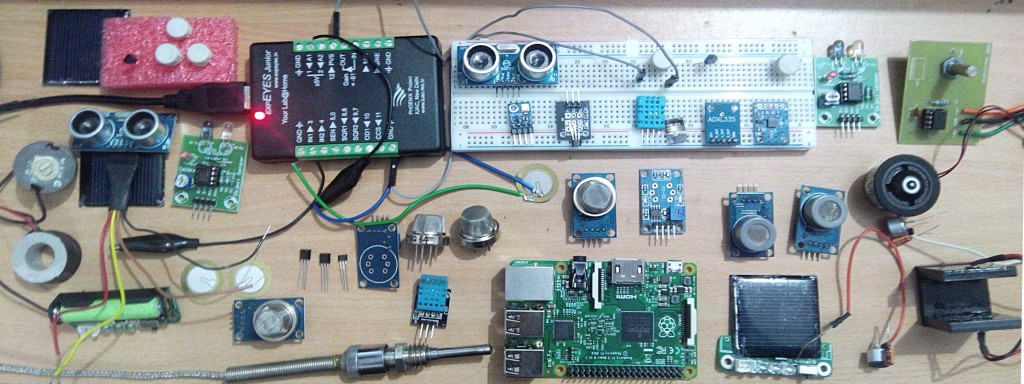
Working on ExpEYES in the last few months has been an amazing journey and I am gratful of the support of Mario Behling, Hong Phuc Dang and Andre Rebentisch at FOSSASIA. I had a lot of learning adventures with experimenting and exploring with new ideas to build sensor plug-ins for ExpEYES. There were some moments which were disappointing and there were some other moments which brought the joy of creating sensor plug-ins, add-on devices and GUI improvements for ExpEYES.My GSoC Gallery of Sensors and Devices: Here are all the sensors I played with for PSLab..The complete list of sensor plug-ins developed is available at http://gnovi.edublogs.org/2015/08/21/gsoc-2015-with-fossasia-list-of-sensor-plug-ins-developed-for-expeyes/Sensor Plugins for ExpEYES The aim of my project is to develop new Sensor Plug-ins for ExpEYES to measure a variety of parameters like temperature, pressure, humidity, wind speed, acceleration, tilt angle, magnetic field etc. and to provide low-cost open source laboratory equipment for students and citizien scientists all over the world.We are enhancing the scope of ExpEYES for using it to perform several new experiments. Developing a low-cost stand alone data acquisition system that can be used for weather monitoring or environmental studies is another objective of our project.I am happy to see that the things have taken good shape with additional gas sensors added which were not included in the initial plan and we have almost achieved all the objectives of the project, except for some difficulties in calibrating sensor outputs and documentation. This issue will be solved in a couple of days.Experimenting with different sensors in my kitchen laboratoryI started exploring and experimenting with different sensors. After doing preliminary studies I procured analog and a few digital sensors for measuring weather parameters like temperature, relative humidity and barometric pressure. A few other sensors like low cost piezoelectric sensor, accelerometer ADXL-335, Hall effect magnetic sensor, Gyro-module etc were also added to my kitchen laboratory. We then decided to add gas sensors for detecting Carbon Monoxide, LPG and Methane.With this development ExpEYES can now be used for pollution monitoring and also in safety systems in Physics/chemistry laboratory. The work on the low-cost Dust Sensor is under progress. Challenges, Data Sheet, GUI programsI had to spend a lot of time in getting the sensor components, studying their data sheets, soldering and setting them up with ExpEYES. And then little time in writing GUI Programs. I started working almost 8 to 10 hours every evening after college hours (sometimes whole night) and now things have taken good shape.Thanks to my mentor at FOSSASIA for pushing me, sometimes with strict words. I could add many new sensor plug-ins to ExpEYES and now I will also be working on Light sensors so that the Pocket Science Lab can be used in optics. With these new sensor plug-ins one can replace many costly devices from Physics, Chemistry, Biology and also Geology Lab.What's next? My Plan for next steps Calibration of sensor data Prototyping stand-alone weather station Pushing data to Loklak server Work on PSLab@Fossasia website Fossasia Live Cd based on Lubuntu with ExpEYES and other…

Continue ReadingA low-cost laboratory for everyone: Sensor Plug-ins for ExpEYES to measure temperature, pressure, humidity, wind speed, acceleration, tilt angle and magnetic field